View Transition
Astro Version:
5.16.16
註:我的明暗主題,不偵測系統偏好。範例在最下方
什麼是 View TransitionH2
The View Transition API provides a mechanism for easily creating animated transitions between different website views. This includes animating between DOM states in a single-page app (SPA), and animating the navigation between documents in a multi-page app (MPA). — https://developer.mozilla.org/en-US/docs/Web/API/View_Transition_API
用來在 SPA(單頁)或 MPA(多頁)做平滑的視圖轉場動畫,透過 document.startViewTransition() 觸發,自動捕捉舊或新視圖快照,產生 ::view-transition 偽元素並執行預設或自訂動畫。
簡單來說 View Transition API 就是一個讓網頁畫面切換時產生動畫效果的工具。不會突然「跳」過去,而是以平滑的動畫過渡。
關鍵階段H3
- ready — 偽元素樹建好,動畫即將開始
- updateCallbackDone — 更新回調 (DOM 切換) 完成
- finished — 動畫結束,新視圖可互動
Astro 實作方式H2
根據 MDN 的 API 跟 Astro Docs 推測 Astro 過渡視圖的實作方式:
- 使用者點擊連結(Route Change)
- (客戶端判斷導航方向 forward/back )
- (新增
data-astro-transition="forward/back"到<html>) astro:before-preparation- (載入內容)
astro:after-preparation- (DOM 開始視圖過渡
document.startViewTransition()) astro:before-swap- (DOM swap)
astro:after-swapastro:page-load
生命週期H3
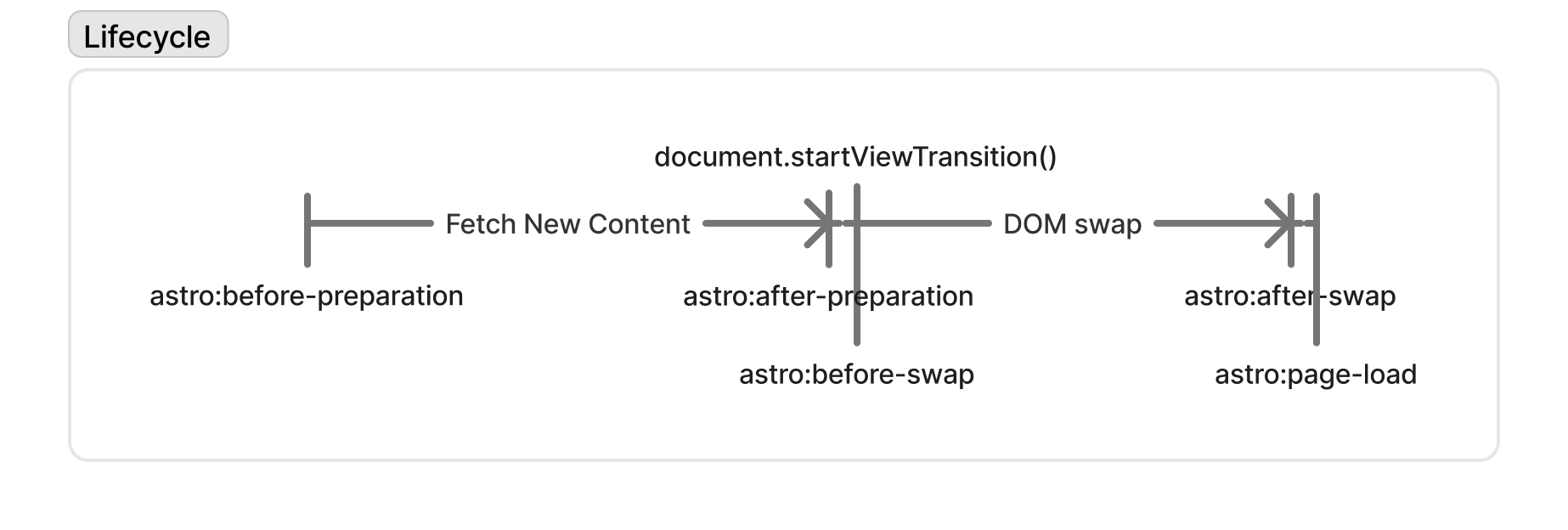
view-transition-lifecycle
左半部在 fetch 向伺服器請求新頁面內容,右半部 DOM swap 過程才會被使用者看到畫面過渡
Before PreparationH3
在頁面導航開始後,但在內容載入之前。
開發上可以通常可以做:
- 最常見的是顯示 loading spinner。
- 可以自訂頁面過渡內容的場景。
- 修改導航方向(就是改變 Forward/Back)
After PreparationH3
在獲取目標內容後,可以停止 Before Preparation 階段啟動的 loading spinner,等操作。
Before SwapH3
可以透過 event.newDocument 在 swap 前先對新 document 套用 theme,避免閃白
After SwapH3
在視圖過渡結束後,可以做的事可以像是:滾動到最上方
Page LoadH3
主要有兩個情況觸發該事件
- Page loaded:初次載入、重新整理、直接輸入網址
- Soft-navigated:點擊站內連結,透過 View Transitions 切換
避免主題色切換狀態消失H3
起初,使用 shadcn/ui 依照 文檔 寫 Dark Mode 會閃白畫面,有點頭大。
不過 shadcn/ui 部分是沒問題的,例如使用 <script is:inline> 表示腳本不會被打包或優化、不會變成 ES module,可以直接原封不動地輸出到 HTML 中(通常瀏覽器解析到這段腳本時,即被執行)
- 首先建議定義函數
setTheme()或applyTheme()和getTheme()在調用比較方便。然後可以直接先呼叫applyTheme() - 接著若依官方提示寫
astro:after-swap時再 applyTheme() 一次
不過,儘管看 YouTube 教學或很多文檔,可能都告訴你在 astro:after-swap 事件 applyTheme 就好,但 after-swap 時新 DOM 已經換上去了,在 applyTheme() 執行前會有一瞬間是預設樣式。
所以可以嘗試看看在 swap 前就先執行判斷主題色,比較不會有閃屏問題。
It work for me!
<script is:inline>
  function getTheme() {
    if (typeof localStorage !== "undefined" && localStorage.getItem("theme")) {
      return localStorage.getItem("theme");
    }
    return "dark";
  }

  function applyTheme(doc = document) {
    const theme = getTheme();
    const isDark = theme === "dark";
    doc.documentElement.classList[isDark ? "add" : "remove"]("dark");

    if (doc === document) {
      document.dispatchEvent(
        new CustomEvent("themechange", { detail: { theme } }),
      );
    }
  }

  applyTheme();

  document.addEventListener("astro:before-swap", (event) => {
    applyTheme(event.newDocument);
  });
</script>